Improving Election Website Usability

A usability study to evaluate how well voters could find information about upcoming elections on a county elections website.
Context
Organization
This project was in partnership with U.S. Digital Response (a non-profit group that partners with governments to deliver critical services to the public) and a county elections department that sought to improve the usability of their website for voters. Given the volume of customer calls and emails, the county partner suspected that critical information was difficult to find on their website, including important information about upcoming elections. Without accurate information, voters could miss the opportunity to exercise their civic right to vote. In other words, usability in this case had ramifications for voter enfranchisement and representation.
Goals
Business goal: Ensure voters can find key election-related information and reduce customer service burden on an already resource-stretched department.
Research goals: Evaluate how well voters can navigate the current website to find key information about upcoming elections, with a focus on identifying key usability pain points and opportunities for improvement.
Team
My role: Research lead, project manager
Partners: Research collaborators, USDR advisor
Stakeholders: County elections director, communications coordinator
Study Design
Method
To understand how well voters could find information on the current website, this project called for an evaluative method. Given that the website was already launched, it made sense to test specific tasks with users through usability testing. Geographic location differences and tight budgets called for the testing to be remote.
Sample
Six registered voters who resided in the county (the priority audience for the county partner). The names and contact information of these individuals were publicly available, which aided recruitment. Also, prior research has shown that 5-6 participants is sufficient to uncover 80% of usability issues.
Tools
Zoom, Google Suite
Process
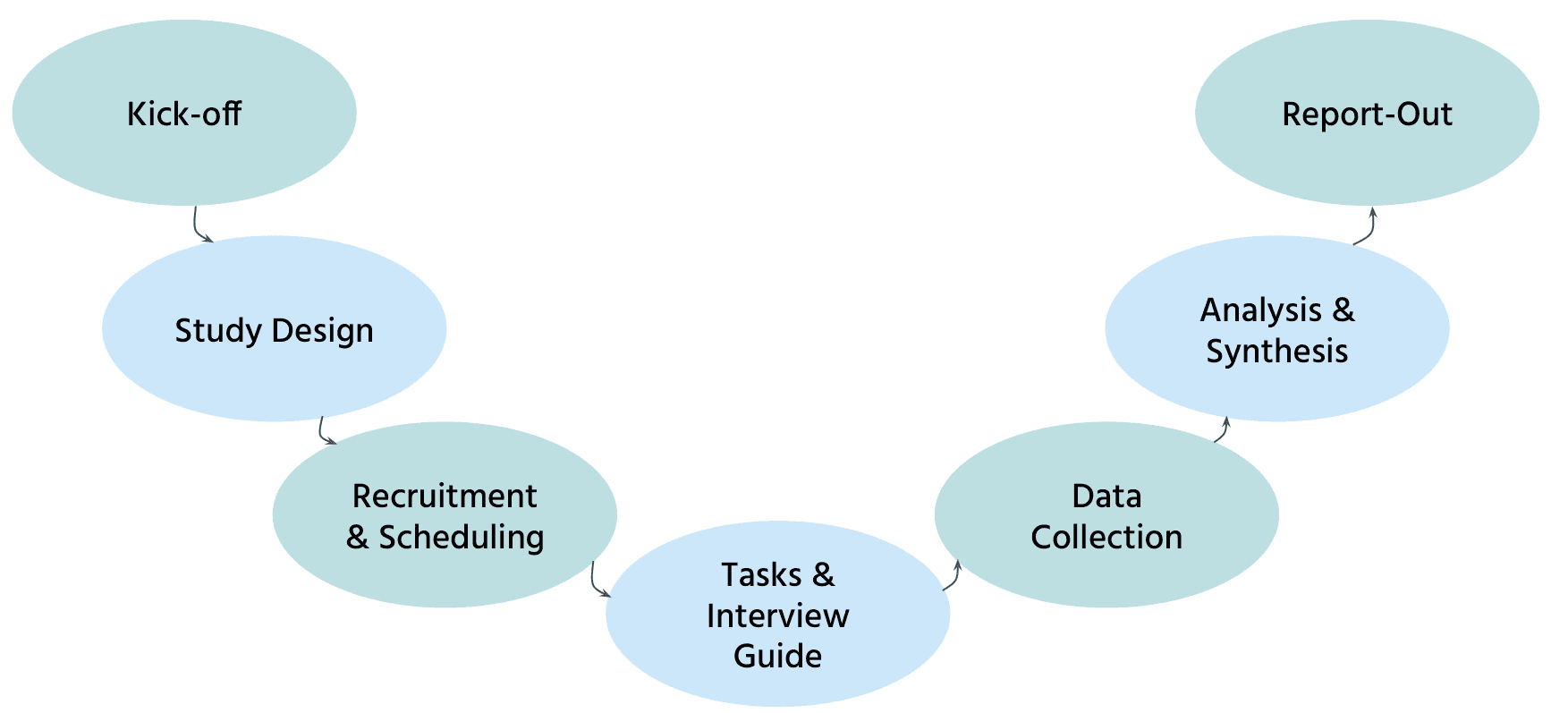
Piloting
An important part of the process was piloting. Through testing with teammates and the first participant, I discovered important issues that could be rectified in the interview guide. I iterated on the guide, making it stronger.
Key Insights
Although most participants completed the tasks, it was often difficult for participants to find information because it was not where they expected it to be and they had to click, read, and scroll through multiple sections to find answers.
Information was often difficult to find because of how it was presented and organized.
It often took multiple steps, clicks, and reading through dense information to find answers to questions.
Information was often not where participants expected to find it, forcing them to backtrack and look elsewhere.
"This information is hard to find... I feel like I'm missing something."
"It was a lot of click throughs to get there, and a lot of clunkiness, scanning, and reading information that I don't necessarily need."
"I look[ed] in places that I would think it would be, but I couldn't find it."
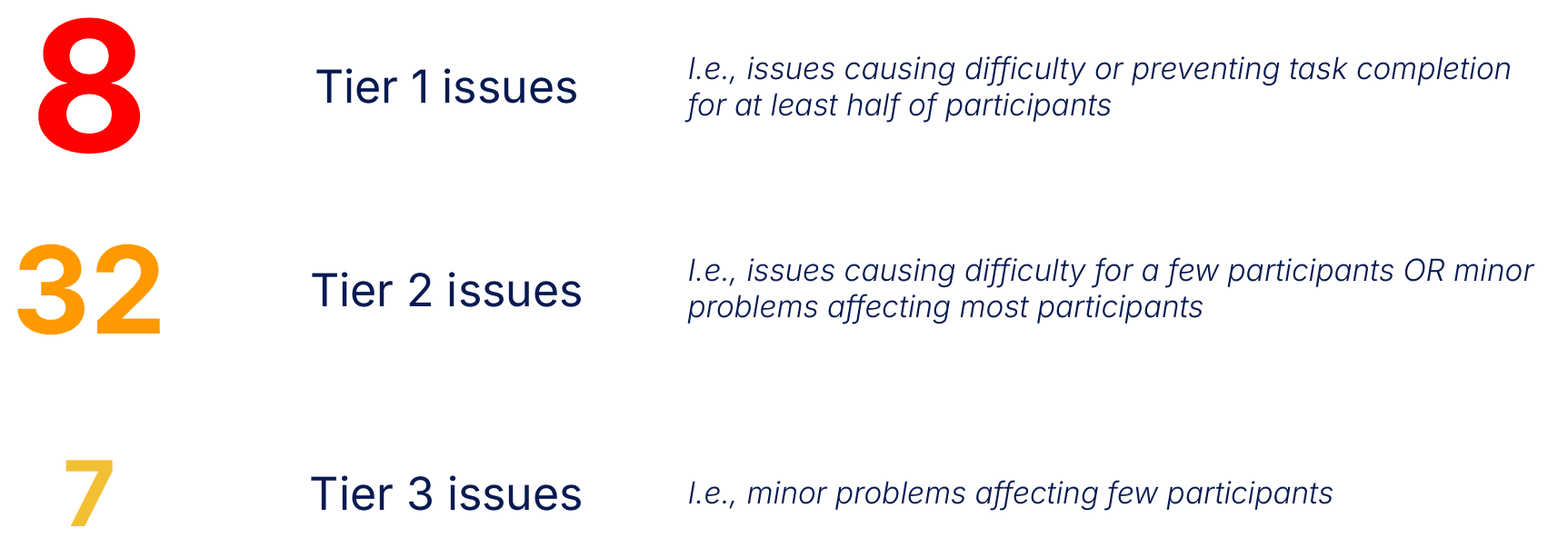
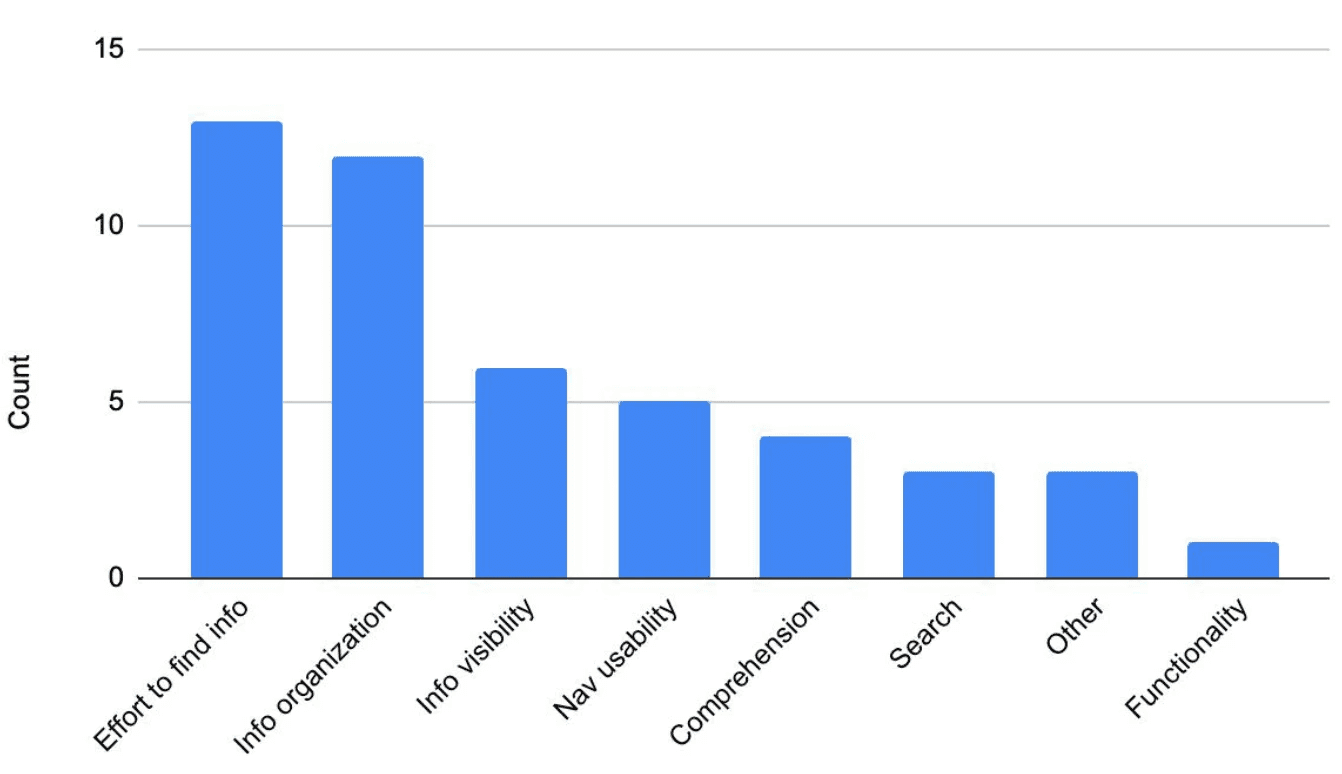
I presented insights at multiple levels, to meet multiple audience needs (i.e., both high-level and granular findings). The biggest viewpoint was overall usability issues and a breakdown of themes:
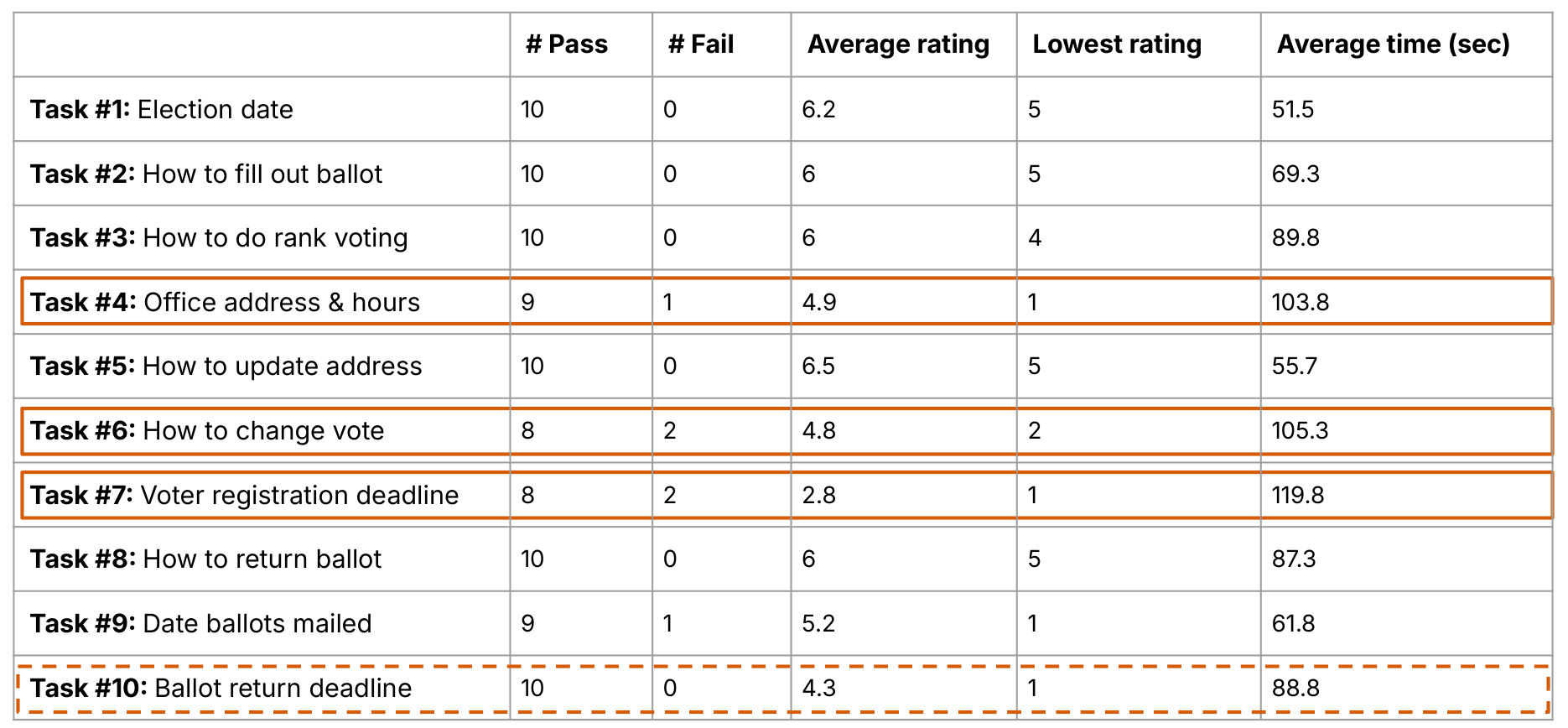
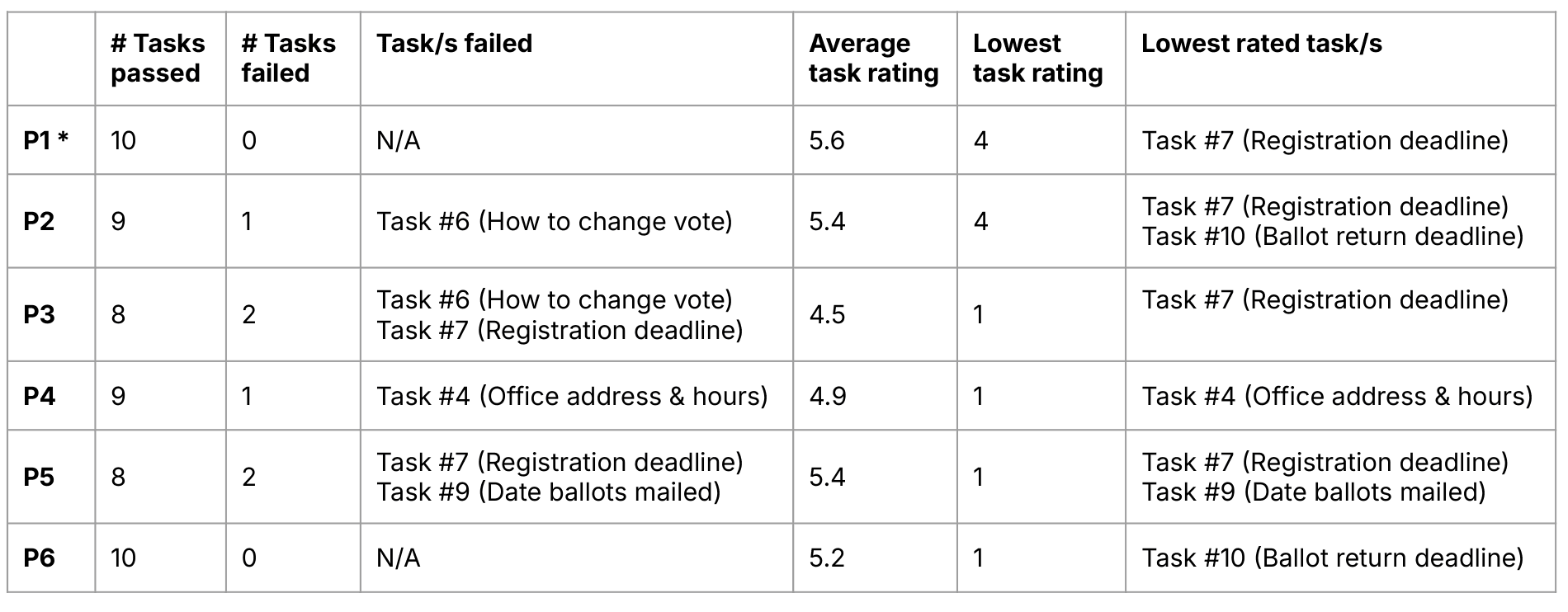
I also presented a summary of results by task and by participant:
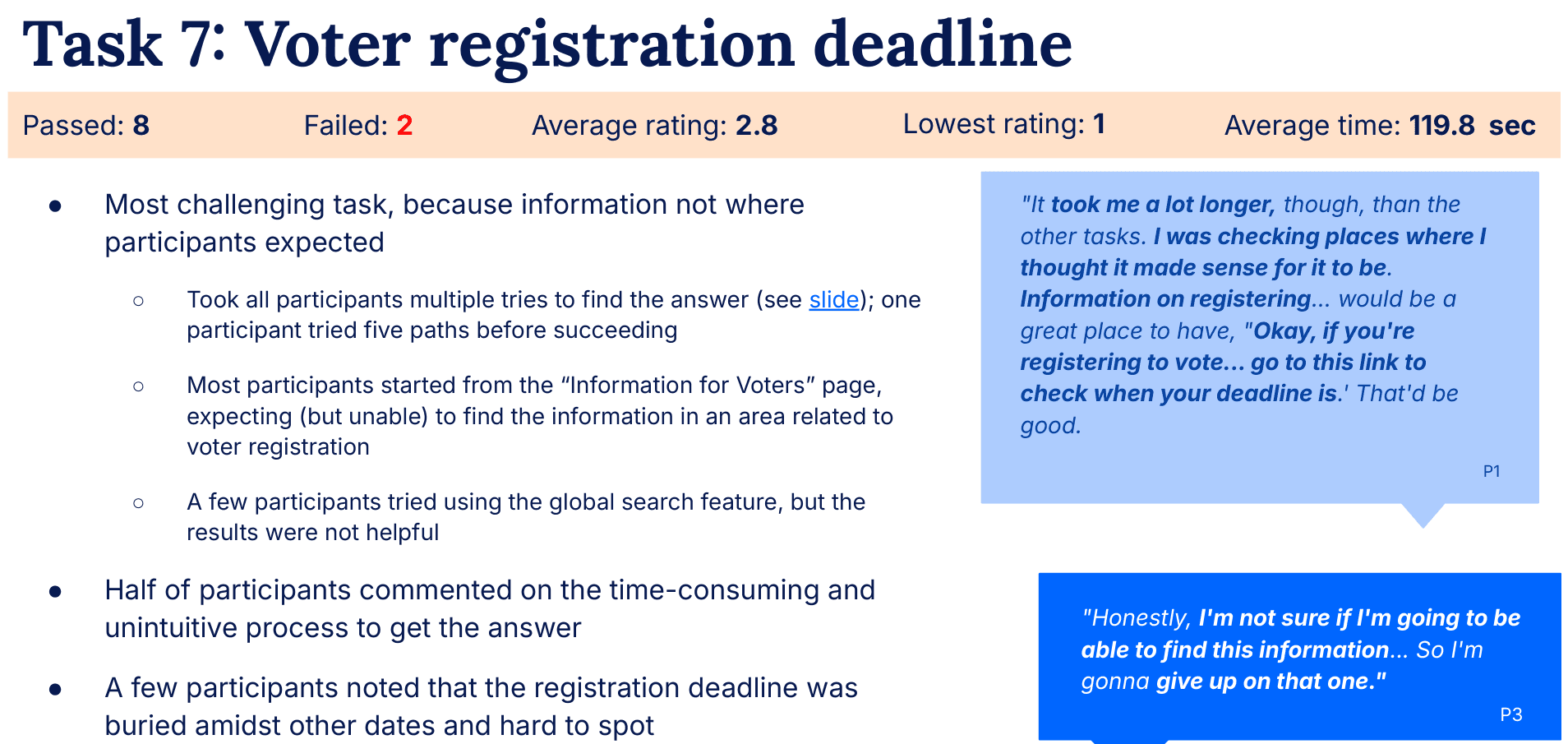
Lastly, I presented detailed results for each task, as shown in this example:
Recommendations
Quick fixes
The first part of my recommendations focused on improving content design in the short term by creating user-centered content. Specific recommendations included:
Duplicating key dates in multiple places (until a more cohesive information architecture was settled upon; see below)
Consolidating redundant sections
Using clearer headers to distinguish between sections
Reducing long text blocks and lists, and highlighting key information through increased visibility
Clarified instructional graphics
Larger lifts
Long-term recommendations focused on information architecture: defining the website’s underlying organization and structure in a way that made sense to users. I recommended the client invest in further research to inform how the site should be organized more broadly, by:
Prioritizing user groups (to provide a compass and guide for further research)
Conducting a content inventory and audit (to understand the current website structure, develop hypotheses, and brainstorm alternatives)
Conduct a card sorting study among prioritized user groups (to generate options for redesigning the information architecture)
Conduct a tree test to evaluate potential hierarchies and select the most promising option
Impact
Impact of this work is ongoing, but includes implemented recommendations regarding more accessible organization and consolidation for a better user experience. More broadly, this project provided the client with their first introduction to user experience and a baseline measurement of their current UX, with a path to make improvements.