Analytics User Experience Study

In-depth interview study with healthcare providers about their goals, needs, and pain points with executive-level reporting dashboards.
Context
Organization
Providence Health & Services (Providence) is one of the largest healthcare systems in the United States. As a mission-driven non-profit, it focuses on serving the most vulnerable populations with care. With over 122,000 healthcare providers in 51 hospitals and 1000 clinics, it has had millions of patient visits - and gathered massive amounts of data. Effective, user-centered internal data analytics tools were necessary for internal decision-makers to measure performance, guide strategy, and improve patient and business outcomes.
However, the analytics ecosystem at Providence was fragmented and chaotic. More research was needed to understand how caregivers used analytics tools; their motivations, needs, and challenges; and how well current tools met their needs. This study built on a prior one that I conducted with intensive-care unit (ICU) nurse managers.
Goals
Business goal: Make performance measurement easier for decision-makers by consolidating three similar executive-level dashboards (each relied upon by a different part of the organization) into a single source of truth, starting with an MVP.
Research goals: Understand why and how top users use these key executive dashboards and uncover user needs and pain points, in order to guide design requirements for MVP.
Team
My role: Research co-lead
Partners: Research co-lead, product designer, data analyst
Stakeholders: Executives, analysts, BI engineers
Study Design
Method
In-depth interviews (a deep qualitative method that could ask “why” and show which tools caregivers were currently using). Given users’ geographic diversity and our tight MVP timeline, I decided on in-depth, semi-structured interviews, conducted remotely, with top users of the existing executive-level dashboards.
Sample
19 internal caregivers who frequently used the dashboards in question (six to seven per dashboard). I balanced across the top role-based user groups - nursing, infection prevention, and quality - and levels of responsibility, from hospital unit managers to regional executives.
Tools
Microsoft Teams, Office Suite, Miro
Process
I adapted my typical sequence of planning, recruitment, data collection, and iterative analysis, reporting, and share-out with a few twists.
Background Research
Given that we would be focusing on existing products, I conducted in-depth research on the three current executive-level dashboards to form a cohesive picture of the current state via:
Expert interviews
Product audits
Log data
This research helped to inform the broader project strategy as well as the interview guide.
Sampling
To get the richest feedback, we needed to talk with caregivers who were familiar with the dashboards already. That meant looking through log data to see which caregivers were frequent users. Since no system for log data review for research recruitment had been established, I set this up myself. Working with a product manager with data analysis expertise, I generated and reviewed user lists and worked with my quantitative research partner and co-lead to identify the most promising candidates.
Parallel Work
To speed up execution, I split up data collection with my co-lead (so that we could get data twice as quickly). But this meant that the insights lived in our separate heads. Using digital collaboration tools, I organized our debrief sessions and led the synthesis process. Knowing our short timeline, I also focused our first deliverable on a simple doc with prioritized recommendations and insights, which I shared with our design and product partners to stimulate discussion (ahead of the full report-out).
Key Insights
The study yielded numerous critical insights into how participants used the dashboards and what barriers affected their usefulness and usability. Due to NDA restrictions, I am unable to share screenshots of dashboards; but needless to say, they were complicated!
Participants used dashboards to share data and assess performance, but less so to improve performance because of UX limitations.
Dashboards were often not detailed or relevant enough to be useful on their own, and data had to be combined with other sources to form a complete picture of performance.
Dashboards were frequently difficult to understand, and circular and repetitive to navigate.
“That's one thing I like about [the dashboard]: that most everybody, from the executive level to many frontline leaders, know about this report and go to [it] as the source of truth, or at least the starting point of the map.”
“A lot of the data that's presented in the dashboard is just numbers: How are we performing against a particular metric, target or goal? But we need to understand the why, connecting the process metric to the outcome metric to better understand the reason for performance. Is this process driving an improvement or not?”
“[The] farther away you get from physicians and executive leaders, the more work goes into explaining what this means - which is more work for nurse managers who have 150 employees and don't have time to explain what this means to a nursing assistant with a high school education.”
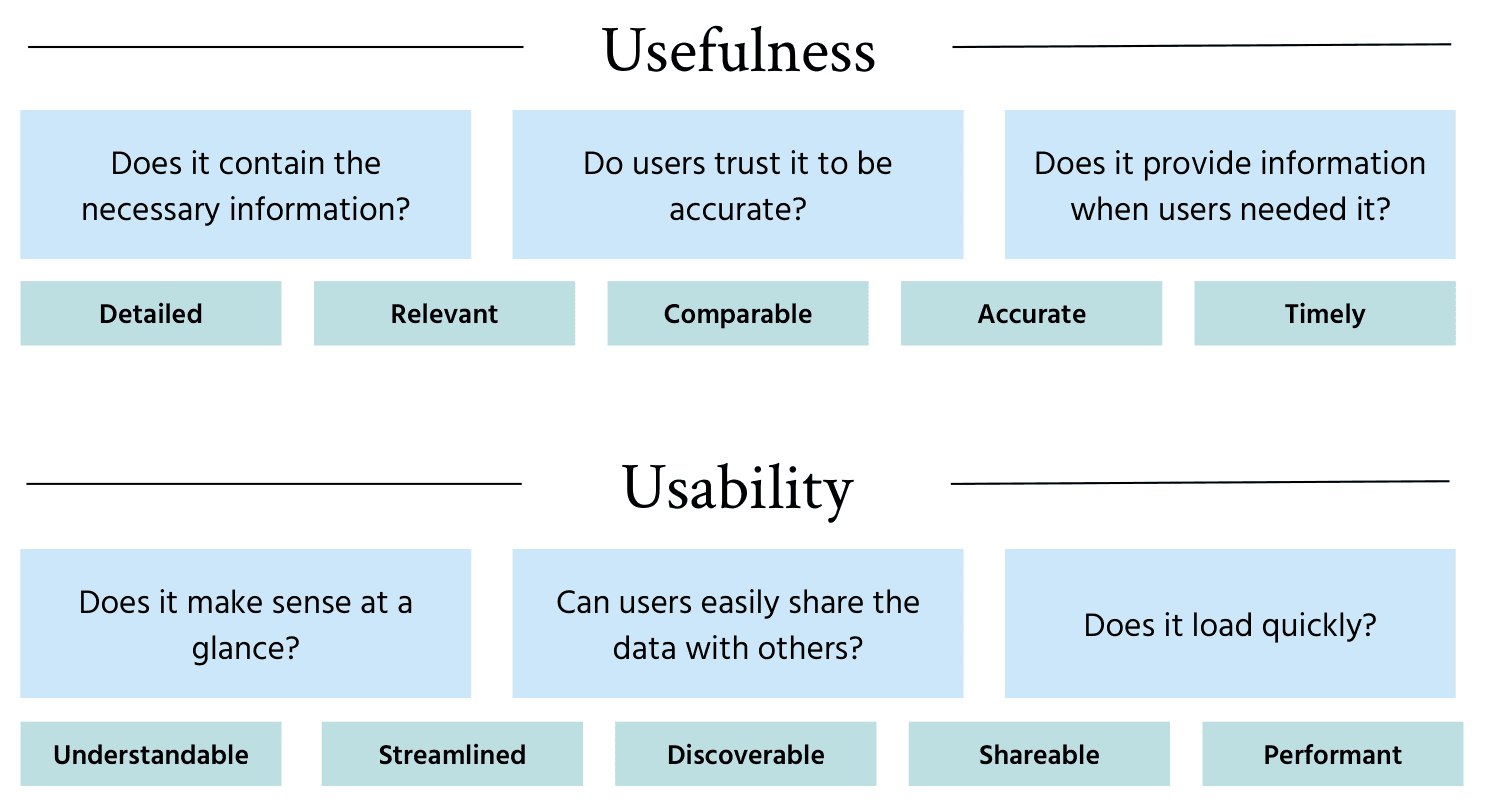
Building on the insights from this study and previous work, I created a reusable framework of design requirements for my design partners, categorized by usefulness and usability.
Recommendations
MVP Design
I broke down the recommendations into six core criteria for MVP design, each with concrete examples of implementation. Specifically, I recommended that the MVP be:
Glanceable (e.g., by enabling users to grasp key point-in-time data, trending data, and performance targets at a glance)
Portable (i.e., by enabling users to copy, download, and share point-in-time and trended data graphs)
Comparable (e.g., by enabling users to compare performance of different entities side-by-side, at any organizational level - from the system down to individual hospital units)
Transparent (i.e., by clarifying how metrics were calculated)
Fast (improving data load speed for busy caregivers)
Discoverable (i.e., by making it easier to find the MVP and related process metrics)
Future Work
I also outlined future design requirements, which required heavier lift and/or were lower priority for the user experience. These included making the dashboard:
Customizable (i.e., by providing flexibility in how metrics were defined, level of data granularity, target types, and data formats)
Comprehensive (i.e., by including related process metrics within the dashboard itself, rather than sending users to other data sources)
Impact
The insights and recommendations helped define the foundation and future of the new executive-level analytics dashboard. First, it led to critical decisions in the MVP design such as:
Including more granular performance data, expanding the usefulness of the product to hospital- and unit-level staff
Adding user controls that enabled users to change how performance data was aggregated (rolling monthly vs. year-to-date), making the data easier to use
Creating a new tab for comparisons between multiple entities at any level of the organization, improving usefulness
Clearer summary indicators through improved color encoding, improving glanceability
The addition of legends and a Help modal, to help users appropriately interpret data
Beyond the MVP, this work provided the design team with its first UX standards, designed to be reusable across future projects.
By improving the usefulness and usability of data tools at Providence, this work will help leaders gain insight into performance, make more data-driven decisions, and ultimately save patient lives.